Software for mobile mechanicsBook it, quote it and get paid from the driveway
MechOS runs on your phone, so the booking request, the estimate, the customer's approval, the invoice and the payment all happen where the car is, not back at a desk at nine at night.
Built around where the car is
Booking requests that ask where
Set your booking page to mobile only, or to workshop and mobile, and a customer asking for a mobile job gives you the address. Requests show a Mobile tag, and the address goes onto the booking when you approve it.
A job location, and directions to it
Every booking carries where the work happens, separate from the customer’s billing address, with a Directions link that opens Google Maps.
Your day on your phone
Your job list has the car, its history and what was asked for. Start and stop the job timer, and update the odometer, build date and VIN as you go.
Quote it, get it approved, get paid
Estimates and tax invoices from one builder
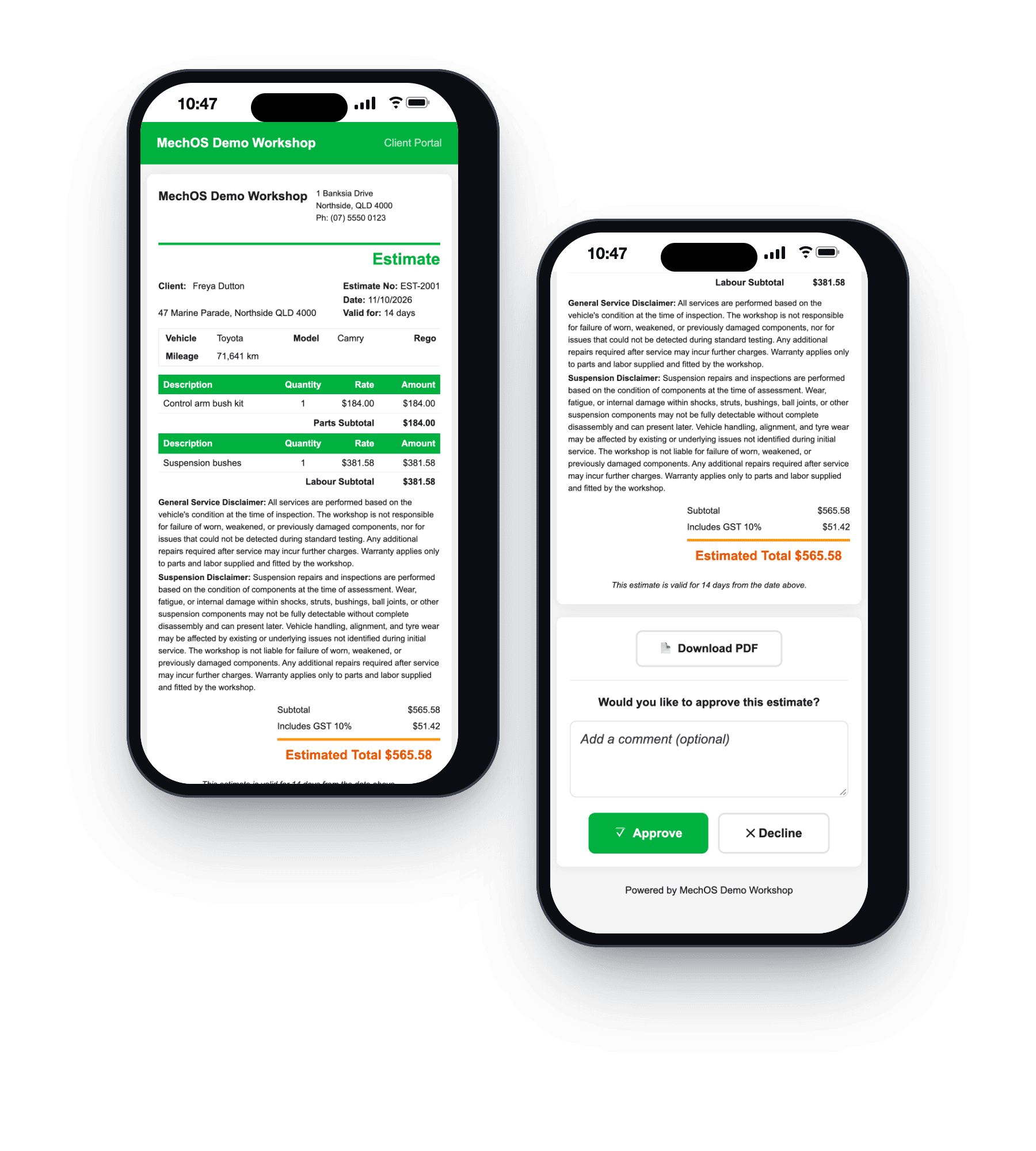
Write the estimate on the spot and add photos; the customer sees them on their online copy. They tap Approve or Decline on their phone, with a comment if they want one, and their answer is recorded with the time. One click turns an approved estimate into a GST tax invoice with every line copied.
A link they tap to pay
Send the invoice and the customer pays by card from the link before you drive off; the invoice marks itself paid. Card payments start once your VenueSmart account is approved.
Cash and transfers, recorded
Record cash, a bank transfer or EFTPOS against the invoice. Paying in full marks the job complete.
Show them what you found
Inspection checklists marked OK, Soon or Now, with measurements and a photo on any line, shared with the customer as a link or a PDF.
When there's more than one van
Your techs on a map
While MechOS is open on a mobile tech’s phone, the office sees their latest position. The map is included, with no key or account to set up, and location history is deleted after 30 days.
Tell the customer you're on the way
One tap texts the customer that the tech is on the way, and you see the message before it goes. Texts are pay-as-you-go.
Contractors with their own ABN
Subcontract mobile techs who run their own ABN, with the split set for each person: labour only, parts margin and labour, or parts and labour revenue.
The vans themselves
Each van has its rego expiry, a list of running costs like fuel, servicing and tyres, and odometer check-ins the driver does from their phone with a photo of the dash.
What you get
- A booking page set to mobile, workshop or both
- The job's location and directions on every booking
- Your job list, timer and vehicle details on your phone
- Estimates with photos, approved from a link
- GST tax invoices from the same lines
- Card payment from the invoice link
- Inspections shared as a link or PDF
- Service reminders by email or text
- A map of mobile techs, history kept 30 days
- Van rego, running costs and odometer check-ins
Questions mobile mechanics ask
Do I need to download an app?
No. MechOS runs in your phone’s browser and can be added to the home screen like an app. There’s nothing to install from an app store.
Can customers pay me on the spot?
Yes, by card from the invoice link on their own phone, once your VenueSmart account is approved, which usually takes a few business days. The invoice marks itself paid. Cash and bank transfers are recorded against the invoice too.
Does it suit a one-person mobile business?
Yes. A solo mobile mechanic can run the whole day on it: booking requests with the job’s address, estimates, invoices, and a payment link the customer taps before you leave.
Does the map track my techs all the time?
No. A tech appears on the map only while MechOS is open on their phone and they’ve allowed location, and location history is deleted after 30 days. Tell your team before you switch it on: under Australian privacy law, staff monitoring should be disclosed.
How-to guides
- Take booking requests from your websiteA public page where customers ask for a job, and a queue beside your calendar where you say yes or no.
- Create a bookingTake a customer call, find the rego, drop the job on a tech's calendar.
- Send an estimate and convert it to an invoiceQuote the job, get the customer's approval, turn it into the final invoice.
- Build and send a tax invoiceConvert a booking to an invoice, add parts and labour, email it with a payment link.
- Record a paymentCash, bank transfer, or in-shop EFTPOS — log it against the invoice.
- The technician screen (My Jobs)What a tech sees on the workshop floor: their jobs, the timer, photos, inspections and leave.
- Track mobile technicians on a mapSee where your mobile techs are, what you need to switch it on, and how long location data is kept.
- Fleet vehicles, equipment and expiry datesRegister your own vans and workshop equipment so nothing expires without someone noticing.
See it on your own jobs
Everything on this page is included at the founding price — $99 a month, locked for as long as you stay. Fourteen days free, no card, and you can bring your existing customers and history across.