Garage and workshop softwareEverything a small workshop does, in one system
The diary by technician, estimates customers approve on their phone, tax invoices, jobs waiting on parts, reminders that bring cars back and EFTPOS at the counter. Built by a workshop that runs on it.
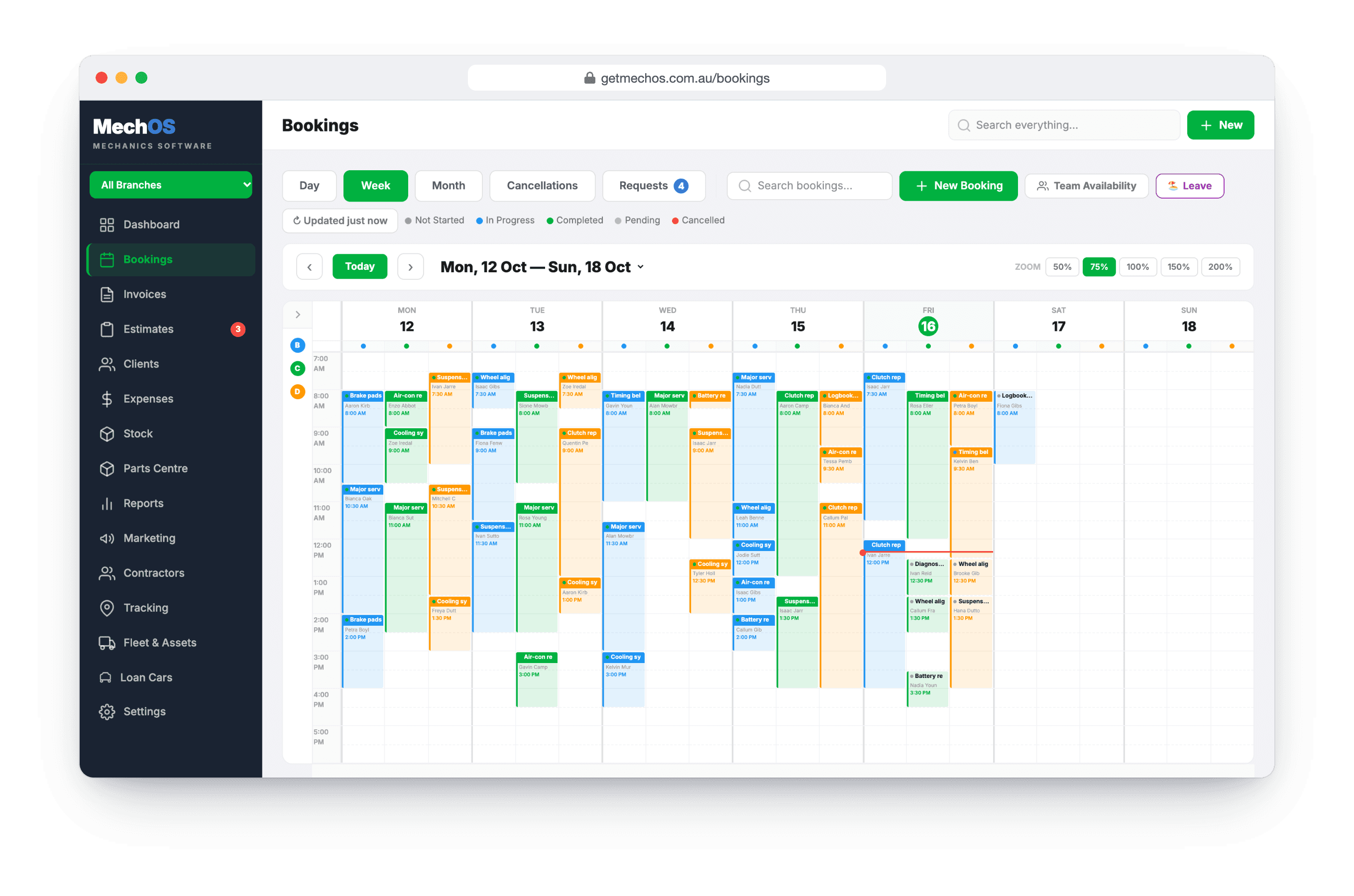
The day, by technician
A diary laid out by tech
Click an empty slot on the day and tech you want, drag a booking to move it to another time or tech, and switch between day, week and month.
Booking requests you approve
Customers ask for a day from your own booking page. Nothing reaches the diary until you approve it, and it’s included in the plan, not an add-on.
Status kept apart from payment
Whether a job is finished and whether it’s paid are separate, so “complete, unpaid” is the short, accurate list of money owed.
From estimate to paid
Estimates and tax invoices from one builder
The customer sees your photos on their online copy of the estimate and approves it from their phone, with the time recorded. One click copies every line into a GST tax invoice.
EFTPOS on the invoice
Pair a Linkly Cloud PIN pad and charge the invoice to the terminal, or send a link the customer taps to pay by card. Card payments start once your VenueSmart account is approved.
Inspections that show what you found
Checklists marked OK, Soon or Now, with measurements and photos, shared as a link or a PDF, and a report on which checks find the most work, by make and model, with each tech’s inspections side by side.
Parts without the chasing
Jobs waiting on parts, in one list
The Parts Centre lists every job waiting on parts, and keeps them out of the unpaid list until the work is done, so only finished jobs count as money owed.
Stock that moves when goods arrive
Raise purchase orders, receive against them in part or in full, and stock only moves when you do. Count it with a stocktake whenever you like.
Bring them back
Service and follow-up reminders
Set a reminder on the invoice and it goes by email, text or both on its date. Reminders start off, so nothing goes to a customer until you choose.
A QR sticker on the windscreen
Scanning it opens the car’s service history, with the next service due and a button to book it in.
Reviews from happy customers
A few days after they’ve paid, ask how the job went. Happy customers go on to your Google listing; unhappy ones come to a private form, so you hear about it first.
The team and the numbers
Every staff member gets their own login, and their role decides what they see. Reports compare the hours you sold against the hours a job actually took, and each quarter’s GST and BAS figures are ready for your accountant.
What you get
- A diary by technician: day, week and month
- Online booking requests, included
- Estimates approved from a link
- GST tax invoices from the same lines
- EFTPOS at the counter and pay-by-link
- Inspections with photos and measurements
- Parts Centre, purchase orders and stocktakes
- Service and follow-up reminders
- QR service record stickers
- Google review requests
- Unlimited staff, each with a role
- Reports and quarterly GST and BAS figures
Questions workshop owners ask
Can we bring our customers and history across?
Yes. Upload your old system’s export as a CSV or Excel file with any column names. Importing is free, we’ll help with your first upload if you need it, and your invoice numbers can carry on from where the old system left off.
Do my technicians see the money?
No. A technician never sees money. A contractor sees only their own.
Is there a limit on staff or branches?
No. Unlimited clients, vehicles, staff and branches are included.
Can customers book themselves into the diary?
They send a request for a day from your booking page, and nothing goes in the diary until you approve it. You decide how long the job takes.
How-to guides
- Getting started with MechOSSign up, fill in your business details, and orient yourself in the app.
- Set up your workshop: the checklistEverything to set up before your first job, in order: about half an hour, plus card payments, which take a few days.
- Import clients and vehicles from a CSVBring your existing customer list over from your old system in one upload.
- Create a bookingTake a customer call, find the rego, drop the job on a tech's calendar.
- Send an estimate and convert it to an invoiceQuote the job, get the customer's approval, turn it into the final invoice.
- Build and send a tax invoiceConvert a booking to an invoice, add parts and labour, email it with a payment link.
- Manage jobs waiting on parts (Parts Centre)Shelve a job that's waiting on parts, track every order, and see when it's ready to book back in.
- Set up service and follow-up remindersSwitch reminders on, then set one on the invoice — the next service, or a follow-up like brakes or tyres. MechOS emails or texts the customer for you.
See it on your own jobs
Everything on this page is included at the founding price — $99 a month, locked for as long as you stay. Fourteen days free, no card, and you can bring your existing customers and history across.