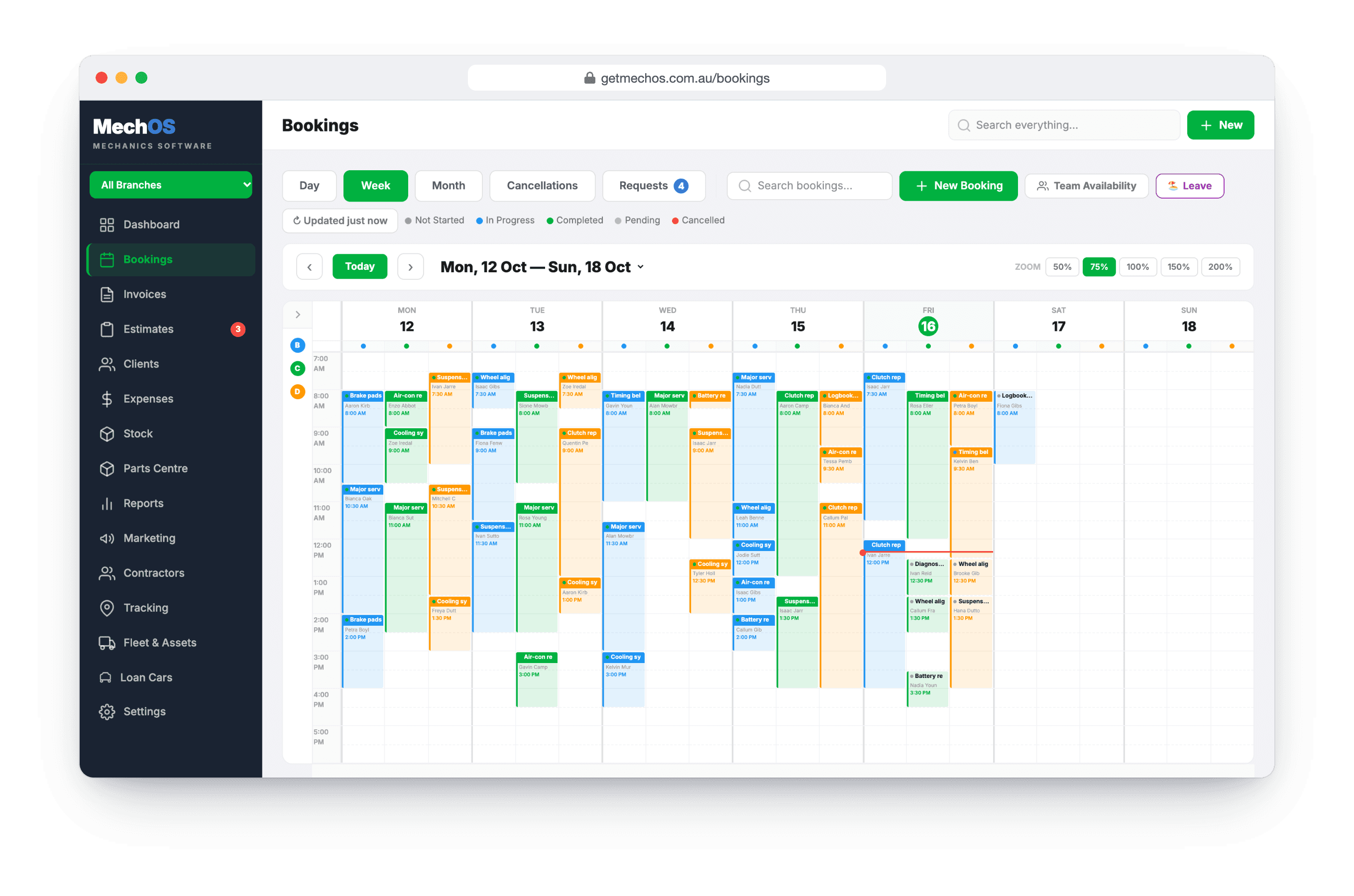
Workshop calendarThe day’s work, one column per technician
Drag bookings between technicians and times, see overlapping jobs side by side, and turn a finished booking into an invoice from the calendar.
A diary that works the way the floor does
Quick checks slot in between bigger jobs, cars come back when the parts arrive, and someone always rings at five to five wanting tomorrow morning. A diary that refuses overlaps, or loses a job the moment it’s cancelled, ends up fighting the workshop instead of running it.
The MechOS calendar lays the day out by technician and lets the day be as messy as it really is.
How it works
Book from an empty slot
Click a slot on the day and technician you want, start typing the customer’s name or rego, and the rest fills in. For a car you’ve not seen before, look up the make, model, year and VIN from the plate.
Drag to move, drag to resize
Move a booking to another time or technician by dragging it, and change how long it runs by dragging its bottom edge.
Overlaps sit side by side
Two jobs on the same technician at once show next to each other instead of being refused, because in a real shop a quick check goes in around a bigger job.
Cancelled, not lost
A cancelled booking turns grey and stays on the calendar for seven days in case it comes back. Restore it from the right-click menu, or drag it back into place.
Confirmations in your own words
Right-click a booking to email or text a confirmation, or a day-before reminder, using the wording you set in Settings. Texts need an SMS channel connected.
From booking to invoice
When the job’s done, right-click and convert it to an invoice with the customer, car and date already filled in, or to a quote if you’re pricing the work first.
What you get
- Day, week and month views
- A column per technician
- Drag to move and resize
- Overlapping jobs side by side
- Cancelled jobs kept for seven days
- Email and SMS confirmations and reminders
- Rego lookup for new cars
- Vehicle history from the booking
- Online booking requests beside the diary
- Convert to an invoice or a quote
Questions workshops ask
Can customers book themselves in?
They can send a request from a booking page of your own. It waits under Requests, beside the calendar, and nothing lands in the diary until you approve it.
Does it text customers on its own?
Not for bookings. A confirmation or reminder goes when someone sends it. A car’s next-service reminder is set on the invoice, and those only go out once you’ve switched reminders on.
Can I see a car’s history from the booking?
Yes. Open the booking and tap Vehicle history on the car for every earlier visit, newest first, with the odometer and the work done. Tap a visit to open its invoice.
How-to guides
- Create a bookingTake a customer call, find the rego, drop the job on a tech's calendar.
- Take booking requests from your websiteA public page where customers ask for a job, and a queue beside your calendar where you say yes or no.
- The technician screen (My Jobs)What a tech sees on the workshop floor: their jobs, the timer, photos, inspections and leave.
See it on your own jobs
Everything on this page is included at the founding price — $99 a month, locked for as long as you stay. Fourteen days free, no card, and you can bring your existing customers and history across.