Online booking for mechanicsTake booking requests online, and keep the diary yours
A booking page with your name on it, for your website, your Google listing and your invoices. Customers pick a day and say what the car needs; nothing goes in the diary until you approve it.
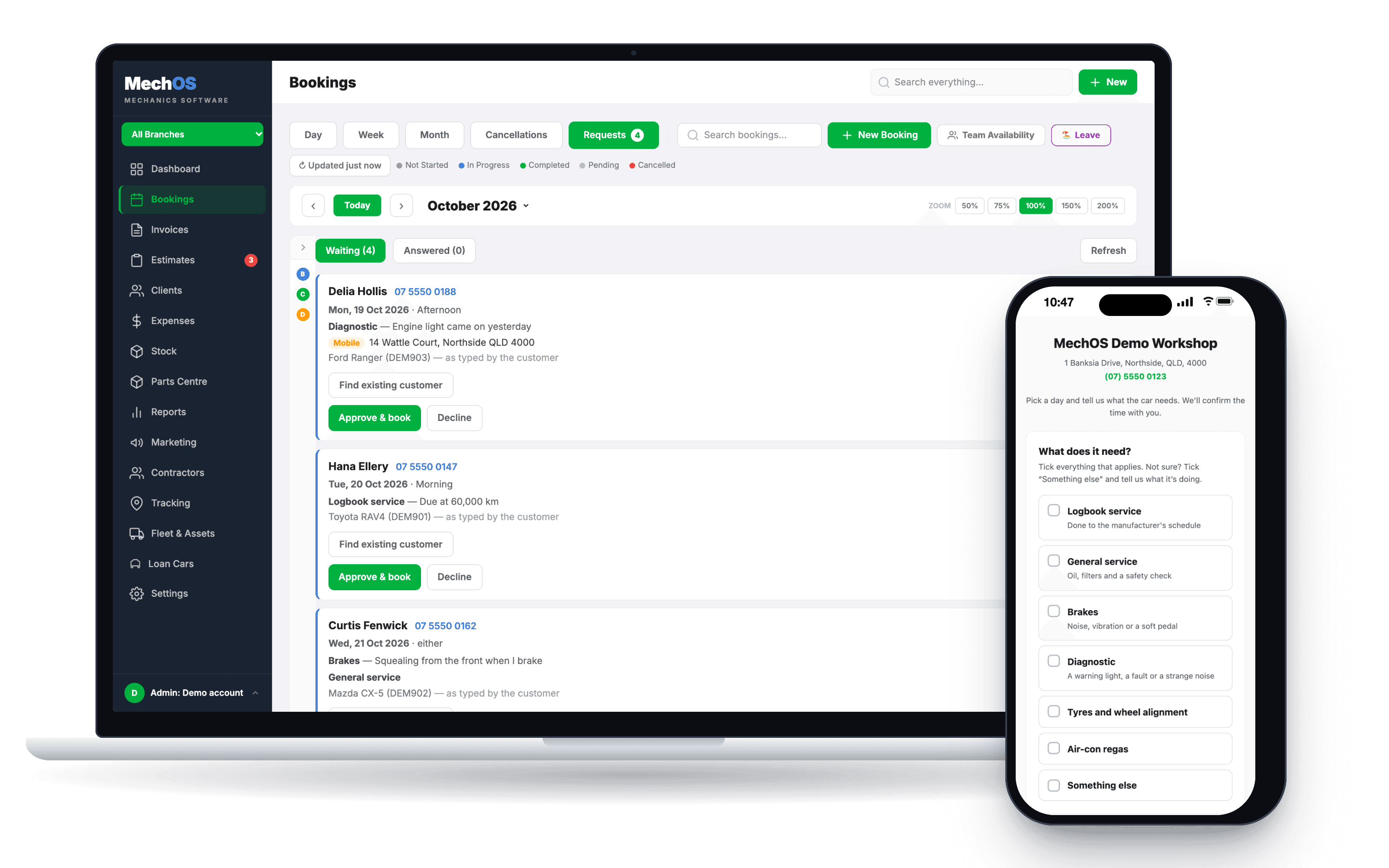
Requests, not bookings
Most online booking lets a stranger put themselves straight into your diary. “Brakes feel funny” goes in as a half-hour slot, and Tuesday morning is gone before anyone has looked at the car.
In MechOS a customer sends a request. Nothing exists in your workshop until you approve it: no client, no car, no job on the calendar. A junk submission is one row you decline, not a record you have to unpick.
How it works
A page that looks like your workshop
Your logo, name, address and phone, and the services you choose to offer, plus “Something else”. Customers can tick more than one, and each one they tick opens a box for what they want done.
Days, not time slots
They pick a day, then morning or afternoon. Days you can’t take are clearly out, worked out from your opening hours and how full you’re happy for a day to get.
Mobile jobs too
If you go to customers, they choose your workshop or a mobile visit and give the address. Mobile requests are tagged, and the address goes onto the booking.
Approve, and it’s in the diary
Requests wait under Bookings with a count on the tab. Approve one and the booking opens with what they typed filled in; pick them first if they’re already a customer. Declining creates nothing at all.
The reply is yours to send
Approving brings up a confirmation in your own wording. It goes when you send it, and you can change it first. Nothing in MechOS texts a customer on its own.
Put the link where customers look
The link never changes, so it’s safe to print. Put it on your website as a plain link or as a button that opens the booking page over your own site, on your Google Business Profile as the appointment link, on Facebook as the page’s button, and in your service reminders and invoices.
What you get
- A booking page with your logo, name and phone
- Your own list of services, more than one per request
- Morning or afternoon on days you can take
- A daily limit so the web never overfills the diary
- Workshop or mobile, with the customer's address
- A booking button for your own website
- A Requests queue with a count on the tab
- An email for each new request, if you want one
- Included in the plan, not an add-on
Questions workshops ask
Can customers pick an exact time?
No, on purpose. They choose a day, then morning or afternoon, because a workshop takes drop-offs rather than running appointments by the minute. You set the time when you book them in.
What if nobody answers a request?
Nothing is deleted. It waits in the queue until someone deals with it, even after the day it asked for, and switching online booking off doesn’t clear it. Turn on the email for each new request so a Saturday enquiry isn’t found on Tuesday.
Does online booking cost extra?
No. It’s included in the plan, not an add-on.
Will it work with my website?
Yes. Paste the button from Settings into Wix, WordPress, Squarespace or whatever your site runs on. There’s nothing to install, and the wording on the button is yours to change.
How-to guides
- Take booking requests from your websiteA public page where customers ask for a job, and a queue beside your calendar where you say yes or no.
- Create a bookingTake a customer call, find the rego, drop the job on a tech's calendar.
See it on your own jobs
Everything on this page is included at the founding price — $99 a month, locked for as long as you stay. Fourteen days free, no card, and you can bring your existing customers and history across.