Digital quote approvalsSend a link. Get the go-ahead in writing.
Your customer opens a quote on their phone — no app, no password. They see the photos of what you found, approve the work, sign the agreement and pay.
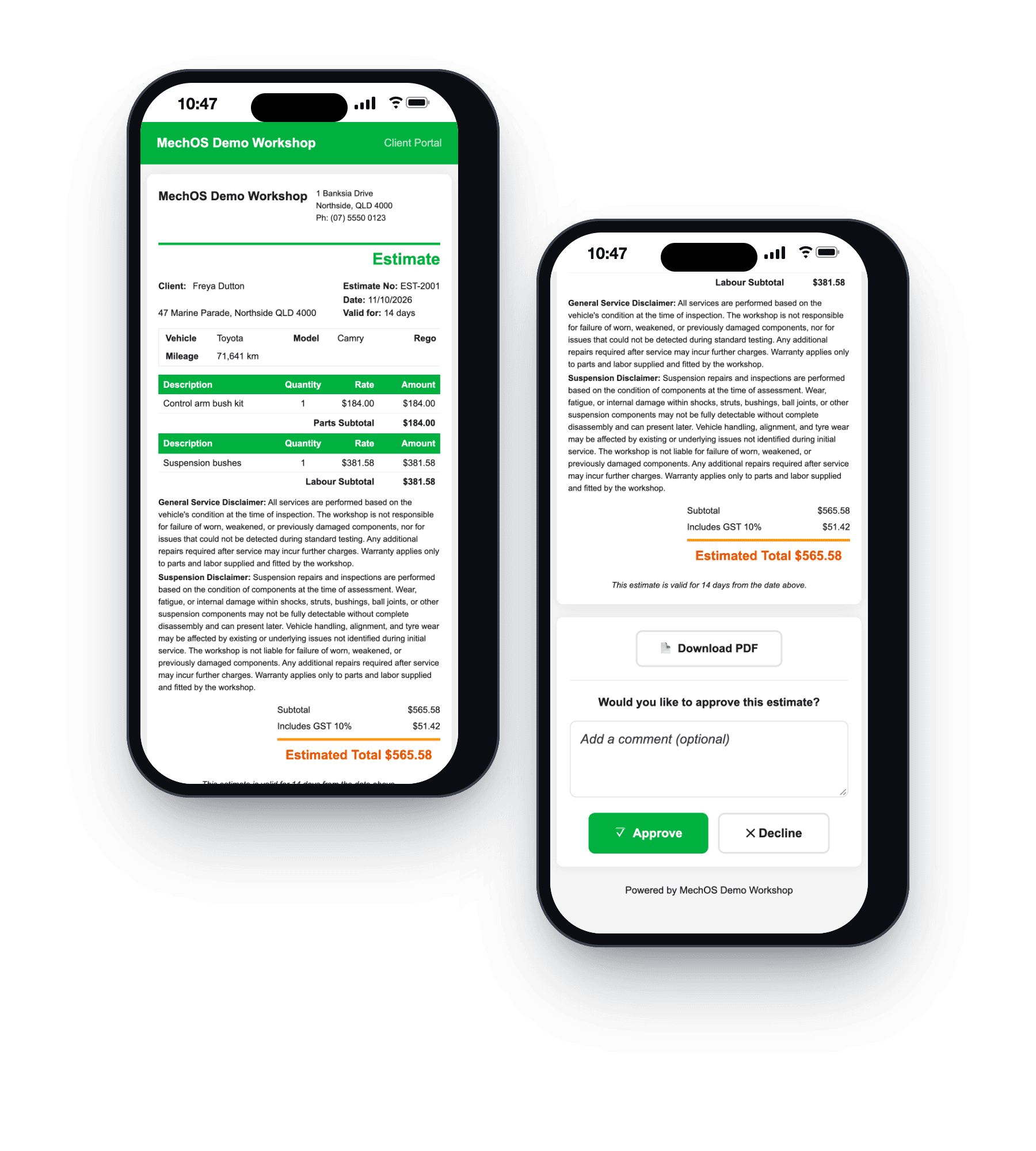
Approval by phone call is the weakest part of the job
You find something on the hoist. You ring. It goes to voicemail. You ring again at lunch, explain it down a bad line, and they say yes. The car goes back together. Three weeks later the invoice is queried and the only record of that conversation is your memory of it.
A link fixes the whole sequence. They read it when they can, they see the photo of the split boot or the worn pad, and the yes is recorded with a time and a name against it.
What the customer can do
Read the quote properly
Line by line, with your terms, on their own screen instead of over the phone in a car park. No login and no app — the link is the access.
See what you found
Photos attached to the estimate show on the portal. This is the part that converts: a photo of the actual component does more than any description, and it is why the work stops feeling like an upsell.
Approve, and be recorded doing it
The approval is captured with who gave it and when. If a customer nominates someone else to authorise work — a partner, a fleet manager, an office — that person is recorded against the job too.
Sign the agreement
Service agreements and loan-car agreements get signed on the phone, and the signed copy goes back to them and to you.
Pay
The same link carries the invoice and a way to pay it, so the gap between finishing the job and having the money is a tap rather than a reminder cycle.
What you get
- One link per job — no customer accounts to manage
- Estimate approval recorded with the time
- Authorised approvers recorded per customer
- Photos of the actual fault, visible to the customer
- E-signature on service and loan-car agreements
- Pay the invoice from the same link
- Quote validity dates that warn rather than block
- Every send recorded — who, what, when
Two deliberate decisions
A quote past its validity date still works. The customer is told it has lapsed and can still approve it. Blocking an approval because a date passed loses you a job you had already won — the date is there to prompt a conversation about price, not to slam a door.
Photos are for the customer, not the paperwork. They show on the portal and stay off the printed invoice and the PDF. The person who needs to see the worn component is the one deciding whether to spend the money.
Questions workshops ask
Does my customer need an app or a login?
No. The quote arrives as a link by email or text and opens in their phone’s browser.
What’s recorded when they approve?
Their answer and the time, with any comment they add, on the quote in MechOS, and an approved quote shows on your dashboard. If they want something changed, they say so in the comment, and you revise it and send it again.
What if the quote has run out?
Quotes are valid for 14 days unless you change it. After that the page says it has expired, but the Approve button still works, so a customer trying to give you the job can still reach you. Treat it as a prompt to check your pricing.
Do customers see my photos?
Yes, on the online copy, under the totals, where they can tap any photo to see it full size. Photos stay off the PDF so the paperwork stays short. When the quote becomes an invoice they come across tagged Before, ready for your After shots.
How-to guides
- Send an estimate and convert it to an invoiceQuote the job, get the customer's approval, turn it into the final invoice.
- Service checklists and inspectionsBuild checklist templates, fill them in on a job with photos, and share the report with the customer.
- Build and send a tax invoiceConvert a booking to an invoice, add parts and labour, email it with a payment link.
See it on your own jobs
Everything on this page is included at the founding price — $99 a month, locked for as long as you stay. Fourteen days free, no card, and you can bring your existing customers and history across.