Set up service and follow-up reminders
Service reminders are the quiet revenue engine of a workshop. Set one on the invoice when you do the job, and MechOS emails or texts the customer when the car is due back — no manual chasing. Follow-up reminders do the same for specific work: brake repair, tyres, a recheck.
Switch them on first
Reminders start off, so nothing goes to a customer until you choose. In Settings → Communications, open Service Reminders and switch on Enable service reminders. Follow-ups have their own switch under Follow-up Reminders.
You can tick reminders on invoices while they’re off. The invoice says it won’t be sent, and it waits. When you switch on, any that fell due in the last 30 days go out during the day, from the send time until 8pm, and the rest go on their dates.
Set a service reminder
- Open the invoice and tap Edit.
- Tick 🔔 Service reminder (in the row of tick boxes above the totals).
- Pick 6 Months, 12 Months or Custom Date. Leave the send time on Default unless you want a different time of day.
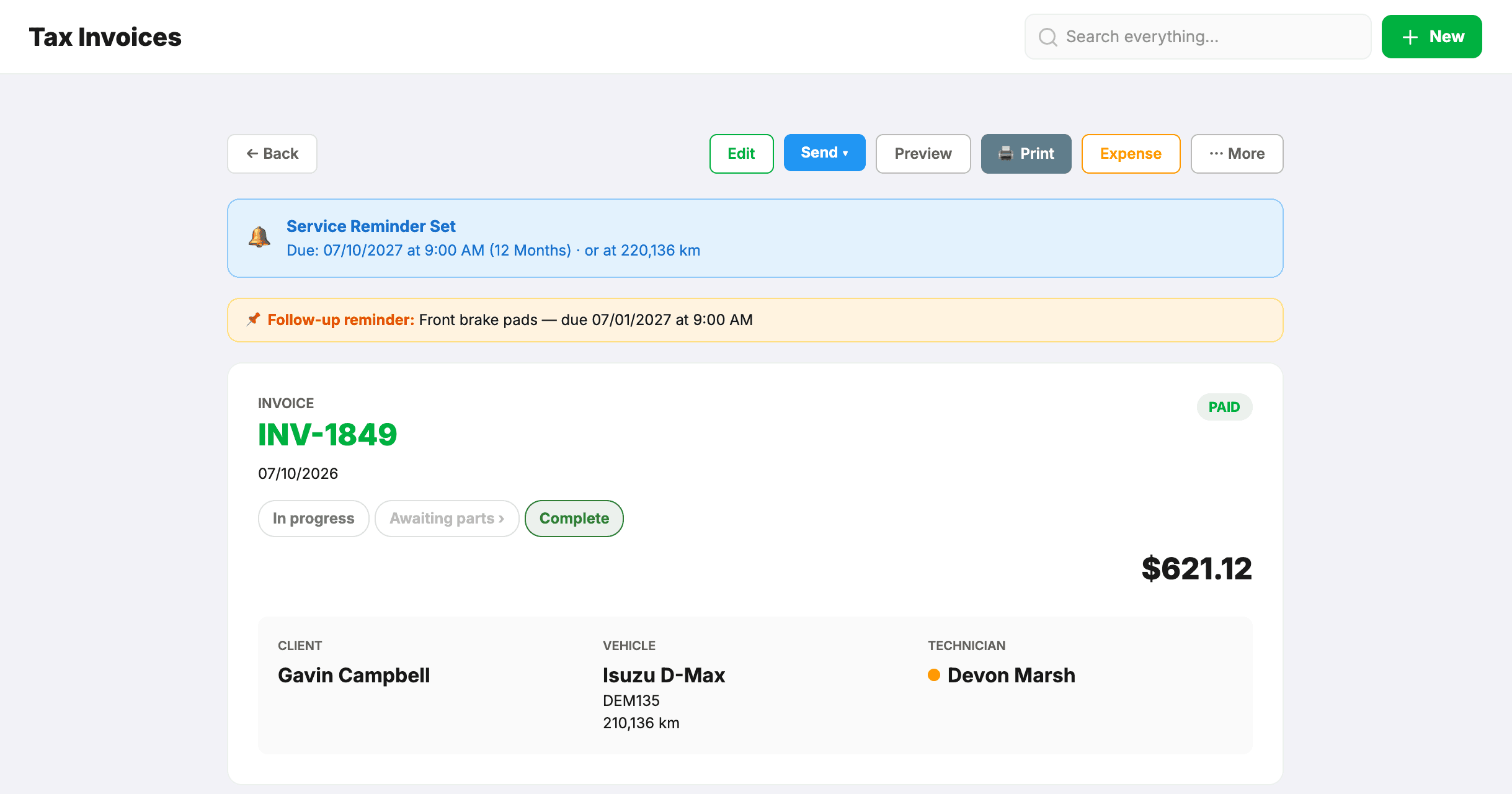
- Save. A blue Service Reminder Set banner on the invoice shows when it will go.
There is one service reminder per vehicle: setting a new one replaces the car’s existing service reminder, so the latest visit always wins. The invoice needs a vehicle on it.
Set a follow-up reminder
For work the customer should come back for.
- On the invoice, tick 📌 Follow-up, next to Service reminder.
- Type the reason — for example “Front brake pads”, “Rear tyres” or “Recheck the oil leak”. It goes into the text and email word for word, so write it for the customer.
- Pick when: in 1, 2, 3, 6 or 12 months, or pick a date.
- Save. An orange Follow-up reminder line on the invoice shows the reason and when it goes.
There is one follow-up per invoice, and it stands on its own: it doesn’t replace the service reminder, and a new service reminder doesn’t cancel it.
Choose how they’re sent, and the wording
Settings → Communications has a section for each — Service Reminders and Follow-up Reminders — with an on/off switch, how it’s sent (Email & SMS, Email only or SMS only) and the wording of the email and the text. In the follow-up wording, {{reminder_note}} is the reason typed on the invoice. Texts go through Podium if you’ve connected it, otherwise MechOS SMS.
When reminders go
- MechOS checks every hour and sends each reminder on its date, at the send time — 9:00am unless you picked another time on a service reminder.
- Each reminder goes once. Change a follow-up’s date and it goes again on the new date.
- A reminder more than 30 days past its date is never sent, so an old date can’t set off a flood of messages.
Customers who opt out
Reminder emails carry an unsubscribe link, and texts sent by MechOS SMS carry an opt-out link. The customer chooses what to stop: service reminders, or specials and offers (which includes review requests). Booking reminders and overdue notices still go. To stop all automated messages, tick Opt out of automated emails on the client’s record; that stops texts as well.